Guide on How to Add a Collaborator on Instagram
Update: Instagram has made collaborating even easier! You can now add multiple collaborators to your posts, and for added flexibility, you can invite collaborators even after your post has been published.*
How to Add a Collaborator on Instagram (Step by Step)
1. Create Your Post
Create a post as you normally would in the Instagram App.
2. Tag People
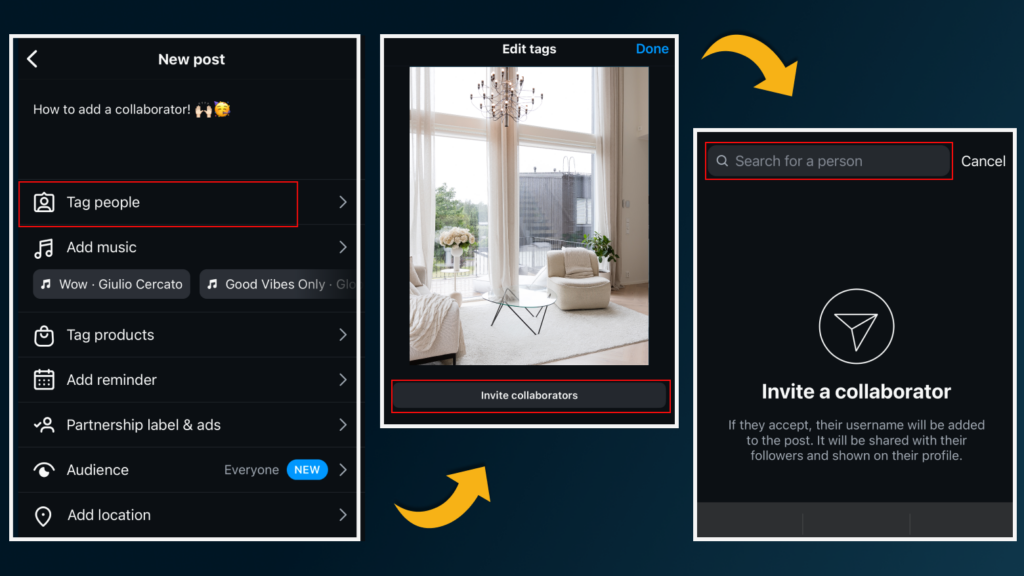
When you get to the final step, click “Tag People”
3. Add Collaborator
Select “Invite Collaborators” after tagging someone. This invites them to be a co-owner of the post.
4. Search and Invite the Collaborator
Type in the name of the account that you want to collaborate with: for example “@cubi.casa“
5. Wait for Collaboration Acceptance
Important! Your tagged collaborator must accept the invitation for the post to appear on their profile. Once accepted, the post will show under both profiles and can boost engagement.
Tip: To ensure your collaboration request is successful, keep your Instagram account public and consider switching to a Business or Professional profile for added features.
Previously you could add collaborators only before the post is published. Now Instagram allows you to invite other profiles that you intend collaborating with – even after posting. Once your collaborator has accepted to be tagged in the photo, they will appear near your username when anyone views your post. This makes it easier for Instagram users to search for their profile and follow them if there’s mutual interest. So if you want to give credit or work together with someone on Instagram – don’t forget to use the collaborate option!
Whom to invite as collaborators to increase your engagement?
Collaborative posts are an excellent way to increase engagement and expand your audience reach. Here are a few ideas for real estate professionals and businesses:
- Showcase Products and Services: Showcase products or brands that you use for your real estate business.
- Invite Collaborators: Add real estate partners, vendors, staging companies, or photographers to your posts to highlight shared projects.
- Tag your Clients and Content Creators: Partner with industry content creators and clients to increase your reach to their followers.
- Highlight Locations: Add location tags or collaborators for venue shoots or property highlights.
FAQ about Collaborator feature on Instagram
Instagram is now allowing users to invite collaborators after the carousel/post/reel has been shared. If your app is updated, the process is easy:
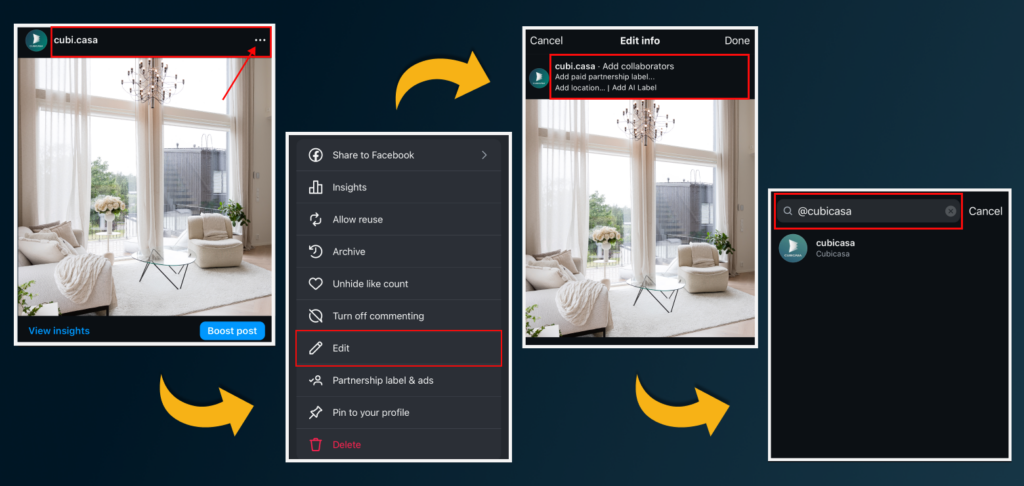
– Go to the Post/Reel and click the three dots in the right top corner.
– Then tap “Edit”
– Tap “Tag People” and “ Add Collaborators.”
– Search for the account, choose “Invite to Collaborate,” and send the invite.
– The invited account will receive an invitation, and upon acceptance, the Reel will appear on their profile.
Yes, you can now add collaborators also from Instagram desktop browser. Some accounts can add collaborators from Meta Business Suite as well. However, this can be challenging if you typically schedule your posts using Creator Studio.
Yes, you can add up to 5 collaborators and 15 tags.
Yes! The process for adding a collaborator to Instagram Reels is similar to adding one to a regular post.
No, adding a collaborator is a separate feature. You can still tag one or multiple accounts in addition to adding a collaborator.
These FAQs provide insights into the limitations and capabilities of the Instagram collaborator feature based on our experience. Learn more on the official Instagram FAQ.
Here are some examples of successful collaborator posts/reels:
Gone are the days when simply listing on MLSs sufficed. Social media is the new frontier for real estate marketing. It’s time to take platforms like Instagram, Facebook, and even TikTok seriously. Here’s why:
Resurfacing Your Work with Fresh Perspectives
Did you know that repurposing your visuals can generate new interest? Don’t limit yourself to posting only once. Embrace diversity! Utilize videos, 3D walkthroughs, and floor plans to offer your clients a comprehensive view on all your services. Reels on Instagram and targeted Facebook groups can significantly expand your reach.
Did you know that CubiCasa 3D renders are social media friendly? Whereas creating 3D tours typically require expensive cameras and lengthy time on site, with CubiCasa you can generate a 3D render walkthrough from a minute scan as well as 2D and 3D floor plans.
Pro Tip: Embrace this step-by-step guide to elevate your social media strategy and boost engagement with collaborators today. Don’t forget to tap the tag and use the top-right corner options to manage collaborations. Collaborative efforts can translate into stronger networks, increased visibility, and ultimately, better ROI for your efforts.
Ultimately, social media success isn’t just about numbers. Prioritize real-life relationships and focus on meaningful conversions over vanity metrics. Seek collaborations with accounts targeting your desired market or those you aspire to reach.