Have you been recommending CubiCasa to your colleagues and found out we offer affiliate income opportunities? Then this article is for you! We are providing account credit for users whose referrals reach 100 paid scans (in total) and affiliate revenue of $1 per paid scan for users whose referrals reached above 100 paid scans (in total).
How to take part in our referral program
Here’s how it works:
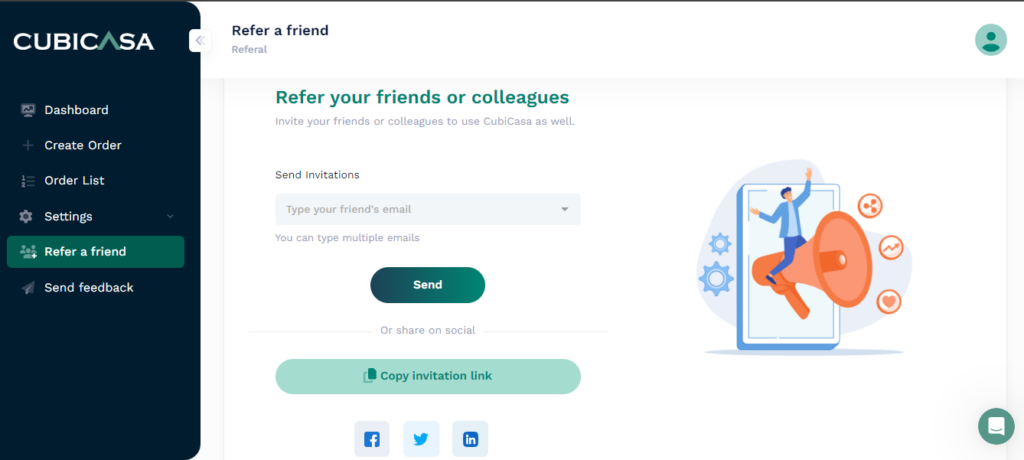
Use “Refer a friend” to start tracking your CubiCasa referrals. You’ll find “refer-a-friend’ tab here:
Log into CubiCasa web portal: https://app.cubi.casa/web/refer-a-friend
Copy your invitation link and save it for future reference
How much you will earn
Referrals will be tallied at the end of the year, and you will receive your rewards all at one time.
- For every paid scan we have received tracked back to your code, we will reward you as follows:
- For the 1st to 100th paid scan, we will reward you with $1 CubiCasa account credit per scan.
- For scans 101 and above, we will reward you with $1 cash payment per scan.
For example, if your referrals resulted in 150 paid scans, your reward would be:
Scan 1 to 100 = $100 CubiCasa account credit, Scan 101 to 150 = $49 cash payment, settled at one time in early 2025.
Please note that this is a trial program and is subject to revision or change at any time. Depending on the success of the program, we keep the right to continue or discontinue it with the same or different terms for 2025.
Thank you for helping us spread the word about CubiCasa, and Happy Scanning!
How to promote your referral link
We will provide a few suggestions on how to promote your referral link to increase the chance of earning affiliate income.
Do you have a following of over 500 followers on YouTube, Instagram, Facebook, Twitter?
Or perhaps you are active on Facebook groups or manage a group, here are some ideas where you can promote your own referral link:
Add it to your YouTube Upload defaults
Here’s how you can set YouTube default upload settings for your channel:
- Go to the YouTube Studio
- Select the Settings option from the menu
- Choose the Upload defaults option
- Fill out your default upload settings
- Save your settings
Let’s go over this process in more detail.
-
Go to the YouTube Studio
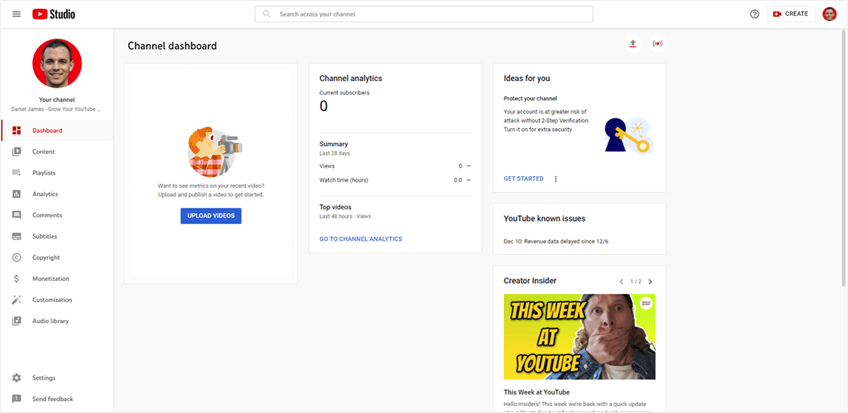
To begin, you must first go to the YouTube Studio. To get to the YouTube Studio, select your profile icon while logged in on YouTube. From there, select the YouTube Studio option from the menu that appears.
- Select the Settings Option From the Menu
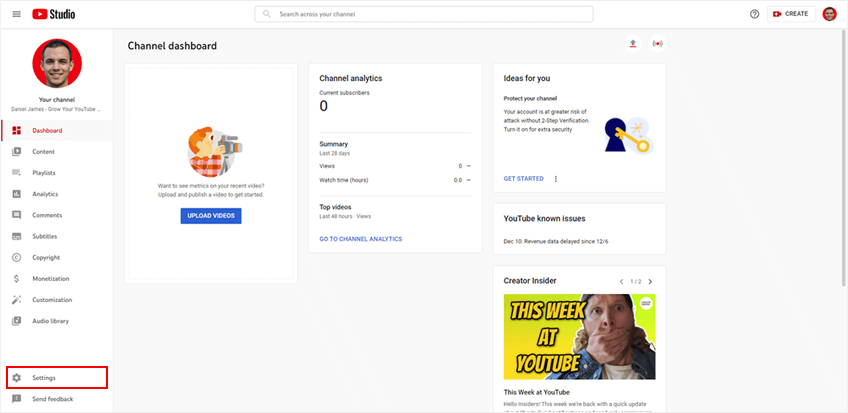
Next, you will need to select the Settings option from the menu. This option will be located on the menu on the left side of your screen while inside of the YouTube Studio. It should be located near the bottom of the menu.
- Choose the Upload Defaults Option
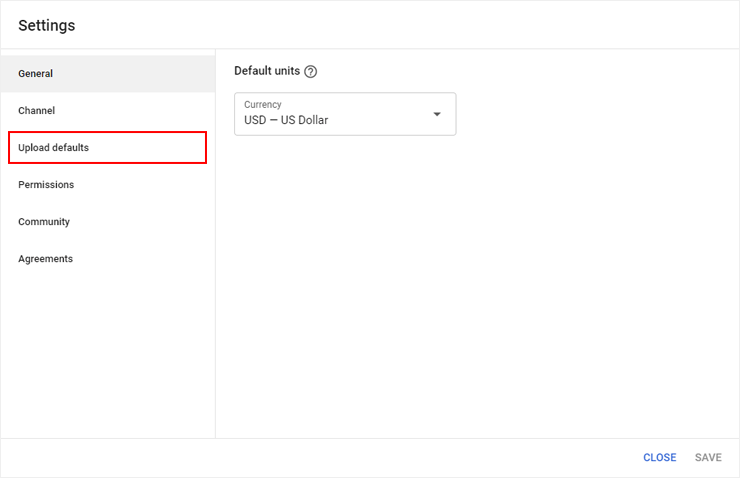
After selecting the Settings option from the menu, a new box should appear on your screen. In this box, a new menu will be present on the left side. The menu option you need to select is the Upload defaults option.
- Fill Out Your Default Upload Settings

On this screen, you can fill out your desired default upload settings. Be sure to fill out settings in both the basic and advanced tabs to ensure that you do not miss any settings that need to be set.
In this section, you can add your referral link (now it will appear on all YouTube videos)
- Save your settings
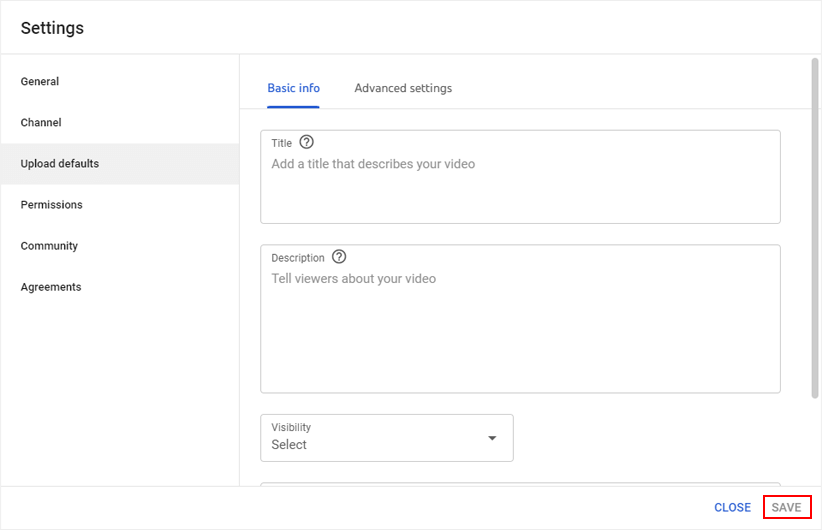
Once you have set your upload defaults, you must save your settings. Doing this is as simple as clicking the save button located in the bottom right corner of the menu box. If you do not save your settings, none of your selected defaults will be applied to future uploads.
Add it into your Linktree:
Promote it by saying “Free floor plans for unlimited properties up to 5k sq ft”
Share with your community on Facebook groups
Promote the link with every post you make about CubiCasa on Facebook groups.
Recommend it on Quora and Reddit
If you stumble upon other professionals asking about CubiCasa. Feel free to respond and share your link so they can also create floor plans for their use case. Every paid product they will order will count towards your account credit and affiliate income.
Promote it on your email newsletter
If you send emails frequently, you can include your referral link into your template so it’s automatically added to each newsletter.
Add your link to YouTube upload defaults, Linktree etc, social media communities so you can collect as many referrals through that link (for each paid scan that a new signup created through this link, we will assign $1). At the end of 2024, we will make the payment for all paid scans that came through the link.
More instructions below: https://tuberanker.com/blog/youtube-upload-defaults
P.S: If our team contacted you with an influencer collab opportunity, use that personalized link instead of refer-a-friend link.
Please note that this is a trial program and is subject to revision or change at any time. Depending on the success of the program, we keep the right to continue or discontinue it with the same or different terms for 2025.
Thank you for helping us spread the word about CubiCasa, and Happy Scanning!